Pay-per-prompt AI
No accounts. No API keys. No credit cards. Just sats and inference.
BETA Real sats, real risks
Owlrun is in public beta. This is live software handling real Bitcoin. Known risks:
- Sats can be lost — bugs in billing, network interruptions, or browser crashes can cause ecash loss. We've tested extensively but edge cases exist.
- Browser storage has limits — ecash proofs live in localStorage. Clearing browser data, using incognito mode, or switching devices will lose your sats. Always withdraw to a wallet when you're done.
- Model availability varies — GPU nodes connect and disconnect. Your request may fail if no node has the model loaded.
- No refund guarantee — if a bug eats your sats, we'll try to help (hello@owlrun.me) but can't guarantee recovery.
Only load sats you're willing to lose. Start small — 100 sats (~$0.07) is enough to test.
Contents
- For Humans
- Use AI — chat with ecash
- How it works
- Compatible wallets
- Earn Bitcoin — run a node
- Install
- How earning works
- Configuration
- Dashboard
- Multiple models
- Payouts
- Requirements
- For Agents/Lobsters
- Buy inference
- X-Cashu header
- API endpoints
- Code examples
- Sell inference — programmatic node
- Registration API
- WebSocket protocol
- Job proxy
- Ecash withdrawal
- Pricing
- FAQ
For Humans
Two sides of the same coin — use AI by paying sats, or earn sats by sharing your GPU. No accounts needed for either.
Use AI — chat with ecash
Owlrun Chat lets you talk to AI models and pay per prompt with Bitcoin ecash. No signup, no accounts — your sats are your session.
Three steps
- Top up — Load ecash from a Cashu wallet, or scan a Lightning QR to top up directly.
- Prompt — Type your message. Each prompt costs a few sats, deducted automatically. Change is returned instantly.
- Take your change — Withdraw your remaining sats before closing the tab. Your ecash lives in the browser — if you close without withdrawing on an incognito session or clean history ... the Sats are gone.
How it works
Your browser holds ecash proofs (digital cash tokens) in local storage. When you send a prompt, the browser attaches those proofs to the request. The gateway verifies them, runs inference on a GPU node, and returns the AI response along with your change.
The gateway claims your proofs at the moment of inference and returns change in the same response. For providers, earnings are held briefly until auto-redeemed to your Lightning wallet (every 60 seconds) or manually withdrawn as ecash.
Compatible wallets
Ecash (load & withdraw)
Minibits — recommended. Available on iOS and Android. Supports cashuA and cashuB token formats.
Use Minibits to:
- Send ecash tokens to the chat (Load sats)
- Receive ecash tokens from the chat (Withdraw)
- Scan QR codes to transfer
Lightning (top up)
Phoenix — recommended. Scan the Lightning invoice QR in the chat to top up your browser wallet.
Any Lightning wallet works for top-up:
- Phoenix, Wallet of Satoshi, Muun, Breez
- Scan the QR → sats arrive in browser
Important: withdraw before closing
Your ecash lives only in this browser tab. If you close it without withdrawing, your sats are lost forever. No recovery. Always click "Withdraw" and scan the QR with your Cashu wallet before leaving.
Earn Bitcoin — run a node
Your GPU's night shift
Owlrun is a lightweight agent that runs silently in your system tray. When your machine is idle, it serves AI inference jobs and earns you Bitcoin. When you come back, it pauses automatically. Under 10% platform fee — you keep 91%+ of every job.
Install
Windows (PowerShell):
irm https://get.owlrun.me/install.ps1 | iexLinux / macOS (bash):
curl -fsSL https://get.owlrun.me/install.sh | bashThe installer handles everything:
- Detects your GPU — NVIDIA (CUDA), AMD (ROCm/WMI), or Apple Silicon
- Installs Ollama — the AI model runtime (if not already present)
- Downloads Owlrun — platform-specific binary with SHA-256 checksum verification
- Generates your provider key — unique
owlr_prov_*API key, auto-created - Registers auto-start — systemd (Linux), launchd (macOS), or Task Scheduler (Windows)
- Launches Owlrun — starts earning immediately
Optional flags for headless/scripted installs:
# Linux/macOS
curl -fsSL https://get.owlrun.me/install.sh | bash -s -- \
  --key owlr_prov_... --wallet user@minibits.cash --referral owlr_ref_...

# Windows
irm https://get.owlrun.me/install.ps1 | iex \
  -ApiKey owlr_prov_... -Wallet user@minibits.cash -Referral owlr_ref_...
How earning works
Your machine                           Owlrun Gateway                    Buyer
+-----------+    WebSocket control    +----------------+    HTTPS API   +-------+
|  Owlrun   | ---------------------->|   gateway.     |<---------------|  App  |
|  + Ollama | <------- jobs ---------|   owlrun.me    |--- response -->|       |
+-----------+ HTTP/2 proxy +----------------+ +-------+- Connect — Owlrun registers your GPU specs with the gateway over WebSocket
- Wait for jobs — the gateway pushes inference requests to your node when a buyer asks for a model you can serve
- Serve inference — your node fetches the buyer's prompt, runs it through local Ollama, and streams the response back
- Get paid — earnings are credited instantly in millisats. Auto-paid to your Lightning wallet every 60 seconds
Revenue split
You keep the vast majority. The gateway takes a single-digit routing margin — under 10% all-in.
| Tier | Monthly tokens | You keep |
|---|---|---|
| Starter | < 1M | 91% |
| Pro | 1M – 10M | 93% |
| Elite | 10M – 100M | 95% |
| Ultra | 100M+ | 96% |
Total effective take: 9% platform + ~1% FX = 9.91%. Lightning routing fees (~5 sats/tx) are network costs, not Owlrun fees.
Affiliate program COMING SOON
Refer nodes and earn a share of the gateway's cut on every job they serve. The referred node's payout is never reduced. Details coming soon.
Karma & free tier
Nodes earn karma by serving free-tier queries — requests from buyers with no payment attached. Karma is calculated from the number of tokens you serve for free.
Higher karma means:
- Priority routing — when paid jobs come in, high-karma nodes are favored
- Faucet priority — the gateway's test faucet sends paid queries to high-karma nodes first
You can set what percentage of your capacity goes to the free tier in your config (free_tier_pct) or from the dashboard. Even a small contribution builds karma over time.
Configuration
Config file location:
- Linux/macOS:
~/.owlrun/owlrun.conf - Windows:
%USERPROFILE%\.owlrun\owlrun.conf
[account]
api_key           = owlr_prov_...           # Auto-generated on install
lightning_address = you@minibits.cash       # Lightning address for BTC payouts
referral_code     =                         # Optional affiliate code (owlr_ref_...)

[marketplace]
gateway           = https://node.owlrun.me  # Gateway endpoint
region            = auto                     # Auto-detected from IP, or set manually

[inference]
model_auto        = true                     # Auto-select best model for your VRAM
max_vram_pct      = 80                       # Max VRAM usage (leave headroom)
keep_warm         = true                     # Keep model loaded in VRAM between jobs
context_length    = 8192                     # Context window (0 = model default)

[idle]
trigger_minutes   = 10                       # Start earning after 10 min idle
gpu_threshold     = 15                       # Only earn if GPU usage < 15%
watch_processes   = true                     # Pause when games/heavy apps run
job_mode          = idle                     # idle (default), always, or never

[disk]
warn_threshold_pct = 30                      # Warn if disk drops below 30% free
min_model_space_gb = 8                       # Reserve space for model downloads
CLI flags
| Flag | Description |
|---|---|
owlrun --version | Show version and network (beta/production) |
owlrun --headless | Run without system tray — for servers and VPS |
owlrun --mock | Mock mode — no Ollama required (development only) |
Dashboard
Once running, open http://localhost:19131 for a live dashboard:
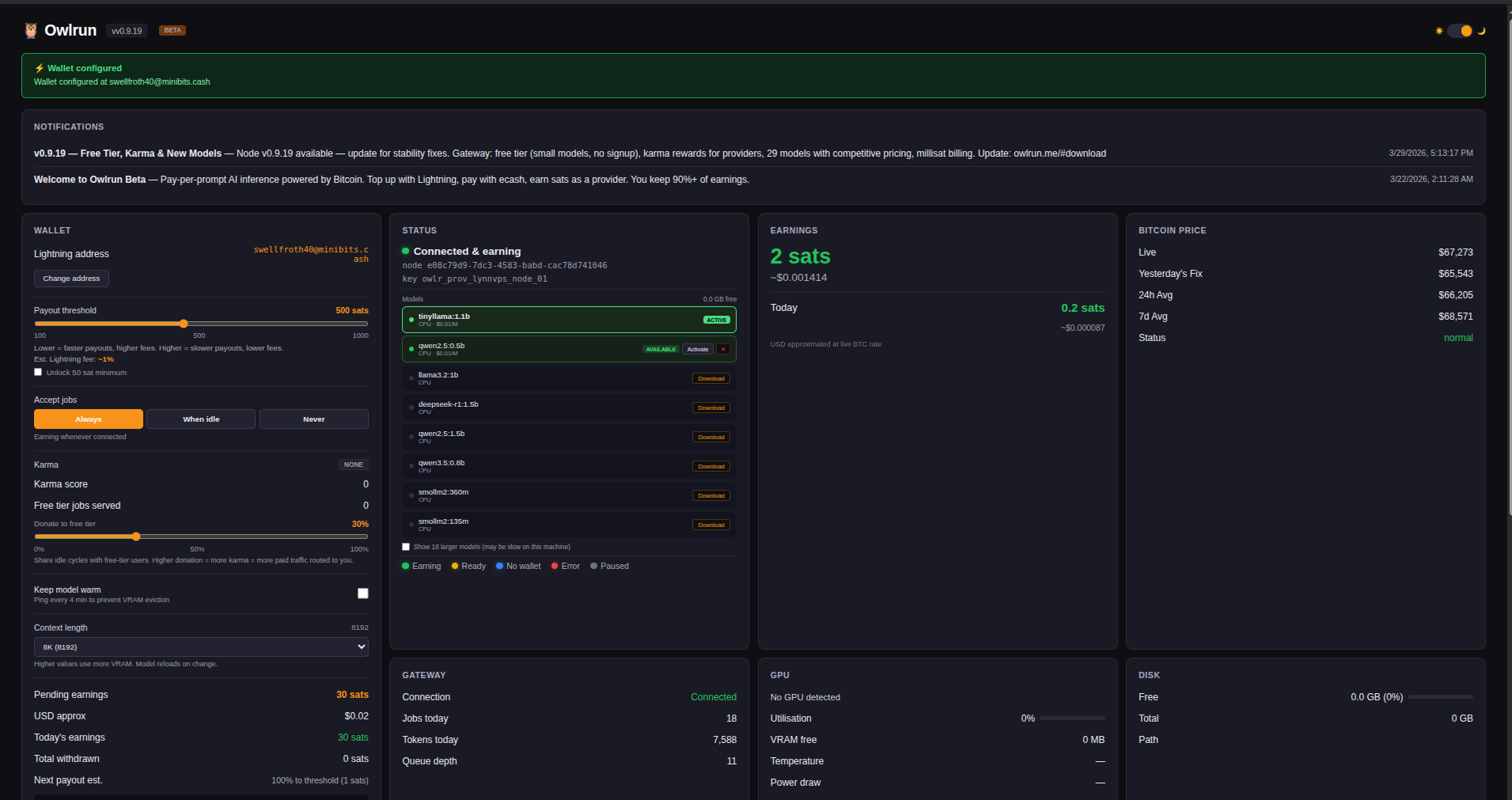
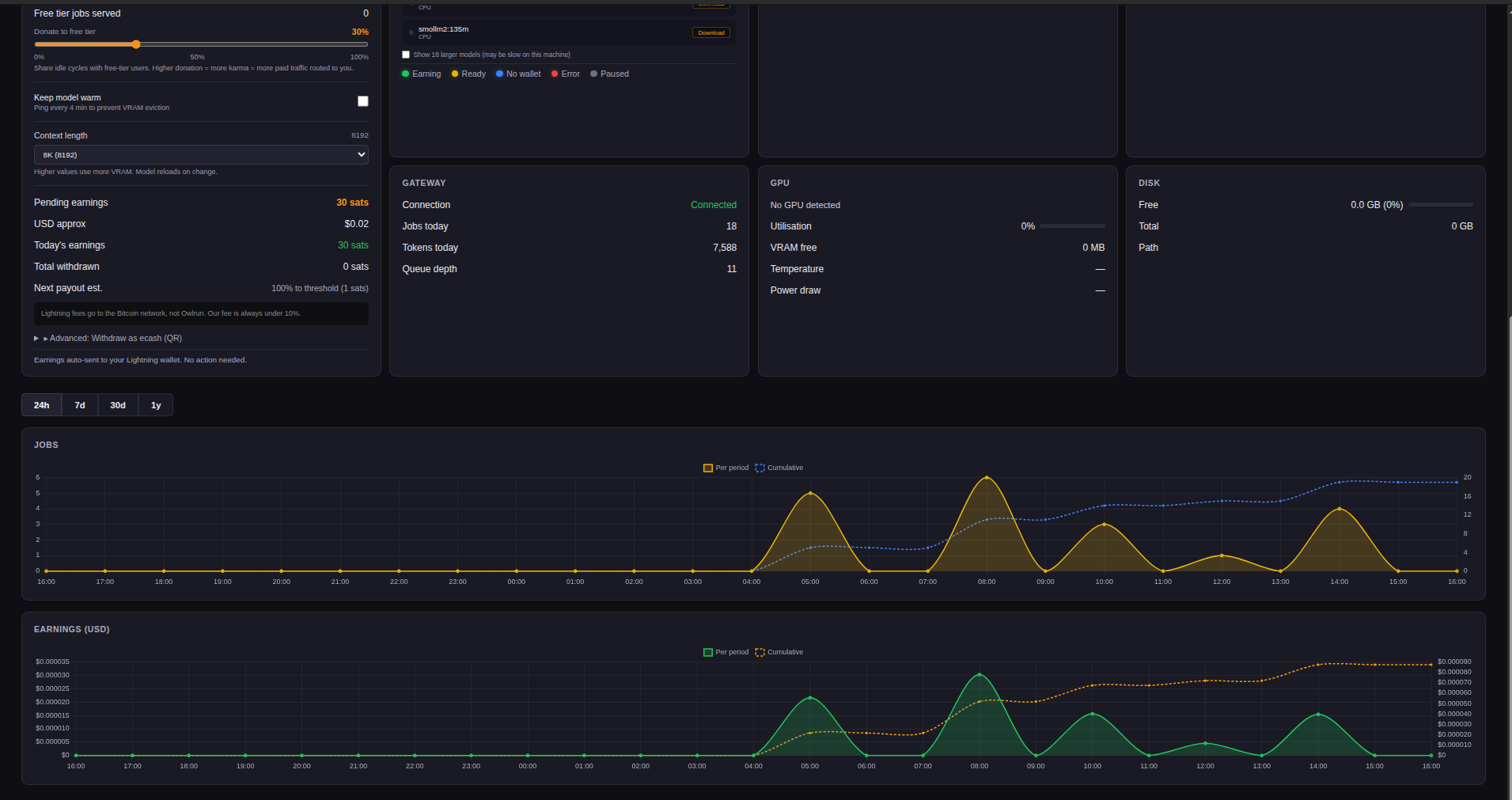
The dashboard shows:
- Earnings — today's mSats earned, total balance, payout history
- GPU stats — utilization, VRAM, temperature, power draw
- Gateway status — connection state, jobs served, queue depth
- Wallet — Lightning address setup, payout threshold, ecash withdrawal
Look for the owl icon in your system tray — right-click for quick access to the dashboard, pause/resume, and settings.
Multiple models
Your node can serve more than one model at a time. When you download multiple models via Ollama, Owlrun registers all of them with the gateway. The gateway can then send jobs for any model your node has available.
How multi-model serving works
- Download models — from the dashboard model browser or via CLI (
ollama pull) - All installed models are registered — when Owlrun connects to the gateway, it reports every model Ollama has downloaded, not just one
- Jobs arrive for any registered model — when a buyer requests a model you have, the gateway routes it to your node
- Ollama handles VRAM automatically — when a job arrives for a model that isn't currently loaded in VRAM, Ollama loads it on demand (adds a few seconds on the first request). Inactive models are evicted from VRAM after ~5 minutes
Downloading models from the dashboard
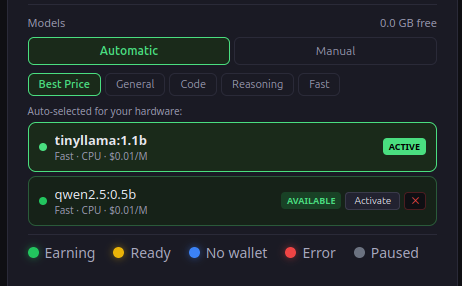
The dashboard at localhost:19131 includes a built-in model browser. Models are split into two groups:
- Fits in VRAM — models that your GPU can run comfortably (shown by default)
- Larger models — models that exceed your VRAM and would run on CPU (slower, hidden by default)
Each model card shows its size, VRAM requirement, and per-token pricing. Click Download on any model to pull it — a live progress bar tracks the download. One download at a time.
After downloading, click Activate to load the model into VRAM and immediately start serving it. Your other installed models remain registered and continue to accept jobs.
You can also download models from the terminal:
ollama pull qwen2.5:14b
ollama pull llama3.1:8b
Models downloaded via CLI are picked up automatically the next time Owlrun reconnects to the gateway.
The "active model" on the dashboard controls which model stays pre-loaded (warm) in VRAM between jobs. This reduces first-request latency for that model. It does not disable your other models — they still accept jobs, they just need a brief cold-load when called.
Recommended strategy: Pull one high-earning model that fits comfortably in your VRAM (your primary earner), plus one or two smaller models for variety. Ollama swaps between them automatically as jobs come in.
Example: RTX 5070 Ti (16 GB VRAM)
ollama pull qwen2.5:14b      # Primary — $0.12/M tokens, ~9 GB VRAM
ollama pull llama3.1:8b      # Secondary — $0.10/M tokens, ~5 GB VRAM
Both models are registered with the gateway. The 14B model earns more per token; the 8B model serves as a fallback and handles requests for a popular model family. Ollama swaps between them as jobs arrive.
If model_auto = true in your config (the default), Owlrun automatically selects the best models for your VRAM. You can also manage models manually from the dashboard or by pulling them directly with ollama pull.
Payouts
Lightning auto-pay (recommended)
Set your Lightning address once. Earnings are automatically sent every 60 seconds when your balance exceeds the threshold.
- Default threshold: 500 sats (adjustable 100–1,000)
- First payout: delayed until balance covers channel opening fee (~2,400 sats) so your first payout is always net positive
- After first payout: fast payouts, negligible fees (~5 sats routing)
Ecash withdrawal (advanced)
Withdraw your earnings as a Cashu ecash token. Zero Lightning fees. Scan the QR code with Minibits to receive.
- Manual — you trigger each withdrawal
- Best for fee-sensitive or tech-savvy users
- Token auto-detected by Minibits (no mint setup needed)
Lightning address setup
Any Lightning address works. Recommended wallet: Minibits (iOS + Android) — supports both ecash receive and Lightning. Your address looks like you@minibits.cash.
Set it in your config file or in the dashboard. The gateway resolves your address to a BOLT11 invoice at payout time.
Requirements
| Component | Minimum | Notes |
|---|---|---|
| GPU | NVIDIA (any CUDA), AMD (ROCm/WMI), or Apple Silicon | CPU-only works for small models, lower earnings |
| VRAM | 2 GB+ | More VRAM = bigger models = higher earnings |
| Disk | 8 GB free | AI models are downloaded on demand |
| OS | Windows 10+, macOS 12+, Linux (x86_64/arm64) | |
| Network | Outbound HTTPS + WSS | Connects to node.owlrun.me — no port forwarding needed |
Example GPUs
Any NVIDIA (CUDA), AMD (ROCm), or Apple Silicon GPU works. Even CPU-only machines can earn on small models. Here are some examples:
| GPU | VRAM | Typical models |
|---|---|---|
| RTX 4090 / 3090 | 24 GB | llama3.1:70b-q4, deepseek-r1:70b, qwen2.5:32b |
| RTX 4080 / 3080 | 10–16 GB | llama3.1:8b, qwen2.5:14b, mistral:7b |
| RTX 4060 / 3060 | 8–12 GB | qwen2.5:7b, llama3.2:3b, phi3:3.8b |
| Apple M1/M2/M3/M4 | 8–192 GB unified | Depends on unified memory — up to 70b models on high-end configs |
| CPU only | N/A | qwen2.5:0.5b, tinyllama:1b, smollm2:135m |
If it runs Ollama, it runs Owlrun. Model selection is automatic by default (model_auto = true) — Owlrun picks the best model your hardware can handle.
Model pricing
Provider earnings per million output tokens (you keep 91%+ of these rates):
| Tier | Models | Input $/M | Output $/M |
|---|---|---|---|
| Nano | smollm2:135m, qwen2.5:0.5b | $0.005 | $0.01 |
| Micro | qwen2.5:1.5b, llama3.2:3b | $0.010–0.015 | $0.02–0.03 |
| Small | qwen3:8b, qwen3.5:9b, deepseek-r1:8b | $0.030 | $0.08–0.10 |
| Medium | phi4:14b, mistral-small:24b | $0.050–0.080 | $0.12–0.20 |
| Large | qwen3:32b, deepseek-v3 | $0.080–0.120 | $0.20–0.30 |
| XL | llama3.1:70b, llama3.3:70b | $0.180 | $0.50 |
Live pricing: GET api.owlrun.me/v1/models. Rates are 20–30% below centralized providers. This is a dynamic market — pricing is subject to change as supply and demand evolve.
🦞 For Agents/Lobsters
Two sides of the same coin — buy inference by paying ecash, or sell inference by connecting GPU nodes. Both are just HTTP + WebSocket.
Buy inference
One HTTP header. No API keys, no accounts, no CAPTCHA. Your agent pays in sats and gets inference. OpenAI-compatible — swap your base URL and add X-Cashu.
The simplest AI inference API
curl -X POST https://api.owlrun.me/v1/chat/completions \
  -H "Content-Type: application/json" \
  -H "X-Cashu: cashuAeyJ0b2..." \
  -d '{"model":"qwen2.5:0.5b","messages":[{"role":"user","content":"Hello"}],"stream":true}'
Attach ecash proofs in the X-Cashu header. No API key needed. Change returned in the SSE stream. That's it.
X-Cashu header
The X-Cashu header carries a cashuA token — base64url-encoded JSON containing ecash proofs from our mint (mint.owlrun.me).
| Header | Value | Required |
|---|---|---|
X-Cashu | cashuA... (ecash token) | Yes |
Content-Type | application/json | Yes |
Authorization | Bearer owlr_buy_... | No — optional, for volume tracking & better rates |
Payment flow
- Claim — Gateway swaps your proofs at the mint (atomic, pre-job). If proofs are invalid or spent, you get 402.
- Inference — Your prompt is routed to the best available GPU node.
- Billing — Actual cost calculated from token count. Minimum 10 mSats per job.
- Change — Overpayment returned as a
cashu_changeSSE event at the end of the stream.
Change delivery
Change arrives as the last SSE event after inference completes:
data: {"id":"chatcmpl-1","object":"chat.completion.chunk","model":"qwen2.5:0.5b","choices":[{"index":0,"delta":{"content":"Hello!"},"finish_reason":null}]}
data: {"id":"chatcmpl-1","object":"chat.completion.chunk","model":"qwen2.5:0.5b","choices":[{"index":0,"delta":{"content":""},"finish_reason":"stop"}]}
data: [DONE]
data: {"type":"cashu_change","token":"cashuAeyJ0b2...","change_sats":48}
data: [DONE]
Critical: Your SSE parser must NOT stop at "finish_reason":"stop" or the first [DONE]. Keep reading until the cashu_change event to receive your change.
Pre-job refund
If inference fails before starting (no nodes available, node rejected), your proofs are returned via the X-Cashu-Change response header — not SSE (streaming hasn't started).
Buyer API endpoints
| Endpoint | Method | Description |
|---|---|---|
/v1/chat/completions | POST | OpenAI-compatible chat inference (streaming) |
/v1/completions | POST | Completion inference |
/v1/models | GET | List available models with pricing (USD per million tokens) |
/v1/oracle/rate | GET | Current BTC/USD rate, margins, pricing formula |
/v1/beta/signup | POST | Get an API key (optional — for volume tracking & better rates) |
/v1/broadcasts | GET | System announcements |
/healthz | GET | Gateway liveness check (returns {"status":"ok"}) |
Non-streaming requests
Set "stream": false to get the full response in a single JSON object instead of SSE chunks:
curl -X POST https://api.owlrun.me/v1/chat/completions \
  -H "Content-Type: application/json" \
  -H "X-Cashu: cashuAeyJ0b2..." \
  -d '{"model":"qwen2.5:0.5b","messages":[{"role":"user","content":"Hello"}],"stream":false}'
Change is returned in the X-Cashu-Change response header (not SSE, since there's no stream).
Rate limits
Default: 60 requests per minute per buyer. Returns 429 Too Many Requests with a Retry-After header. X-Cashu proofs are refunded if rate-limited after claiming.
Error responses
| Status | Meaning | Action |
|---|---|---|
| 400 | Invalid X-Cashu token | Check token format (must start with cashuA) |
| 401 | No payment method | Add X-Cashu header with ecash, or a valid Authorization: Bearer key |
| 402 | Proofs spent or invalid | Mint fresh ecash |
| 429 | Rate limited | Wait for Retry-After seconds. Proofs refunded via X-Cashu-Change |
| 503 | No nodes available | Check X-Cashu-Change header for refund, retry |
Code examples
Python
import requests
import json

API = "https://api.owlrun.me"
TOKEN = "cashuAeyJ0b2..."  # your ecash token

resp = requests.post(f"{API}/v1/chat/completions",
    headers={
        "X-Cashu": TOKEN,
        "Content-Type": "application/json",
    },
    json={
        "model": "qwen2.5:0.5b",
        "messages": [{"role": "user", "content": "What is Bitcoin?"}],
        "stream": True,
    },
    stream=True,
)

change_token = None
for line in resp.iter_lines():
    if not line:
        continue
    text = line.decode()
    if text.startswith("data: "):
        text = text[6:]
    try:
        data = json.loads(text)
        if data.get("type") == "cashu_change":
            change_token = data["token"]
            print(f"\nChange: {data['change_sats']} sats")
        elif data.get("choices") and data["choices"][0].get("delta", {}).get("content"):
            print(data["choices"][0]["delta"]["content"], end="", flush=True)
    except json.JSONDecodeError:
        pass

# change_token contains your remaining sats — save it for next request
JavaScript (Node.js)
const resp = await fetch("https://api.owlrun.me/v1/chat/completions", {
  method: "POST",
  headers: {
    "X-Cashu": "cashuAeyJ0b2...",
    "Content-Type": "application/json",
  },
  body: JSON.stringify({
    model: "qwen2.5:0.5b",
    messages: [{ role: "user", content: "What is Bitcoin?" }],
    stream: true,
  }),
});

const reader = resp.body.getReader();
const decoder = new TextDecoder();
let buffer = "";

while (true) {
  const { done, value } = await reader.read();
  if (done) break;
  buffer += decoder.decode(value, { stream: true });
  const lines = buffer.split("\n");
  buffer = lines.pop();
  for (const line of lines) {
    const trimmed = line.trim();
    if (!trimmed) continue;
    const data = trimmed.startsWith("data: ") ? trimmed.slice(6) : trimmed;
    try {
      const parsed = JSON.parse(data);
      if (parsed.type === "cashu_change") {
        console.log(`\nChange: ${parsed.change_sats} sats`);
        // Save parsed.token for next request
      } else if (parsed.choices?.[0]?.delta?.content) {
        process.stdout.write(parsed.choices[0].delta.content);
      }
    } catch {}
  }
}
curl (one-liner)
curl -N https://api.owlrun.me/v1/chat/completions \
  -H "X-Cashu: cashuAeyJ0b2..." \
  -H "Content-Type: application/json" \
  -d '{"model":"qwen2.5:0.5b","messages":[{"role":"user","content":"Hello"}],"stream":true}'
Sell inference — programmatic node
Building your own node client, a fleet manager, or integrating GPU capacity into an existing system? Here's the full provider API. The standard Owlrun client uses these same endpoints.
Registration
Register your node with the gateway. This must happen before connecting the WebSocket control channel.
POST https://node.owlrun.me/v1/gateway/register
Authorization: Bearer owlr_prov_...
Content-Type: application/json

{
  "node_id":            "uuid-v4",
  "gpu":                "NVIDIA GeForce RTX 4090",
  "gpu_vendor":         "nvidia",
  "vram_total_mb":      24576,
  "vram_free_mb":       22000,
  "vram_exact":         true,
  "models":             ["llama3.1:8b", "qwen2.5:0.5b"],
  "ollama_url":         "http://127.0.0.1:11434",
  "region":             "us-east",
  "version":            "0.2.0",
  "wallet":             "",
  "lightning_address":  "you@minibits.cash",
  "redeem_threshold_sats": 500
}
Response (200):
{ "status": "registered", "node_id": "uuid-v4" }Rate limit: 30 registrations per IP per hour.
| Field | Required | Notes |
|---|---|---|
node_id | Yes | Stable UUID for this machine — generate once, persist |
gpu, gpu_vendor | Yes | Model name and vendor (nvidia, amd, apple, cpu) |
vram_total_mb, vram_free_mb | Yes | Total and currently free VRAM. CPU nodes send 0. |
models | Yes | Ollama model tags currently loaded or pullable |
ollama_url | No | Defaults to http://127.0.0.1:11434 |
region | No | Auto-detected from IP if omitted |
lightning_address | No | LNURL-pay address for auto-payouts |
redeem_threshold_sats | No | Auto-pay threshold in sats (default 500) |
WebSocket control channel
After registration, open a persistent WebSocket for job assignment and heartbeat:
wss://node.owlrun.me/v1/gateway/ws?api_key=owlr_prov_...All messages are JSON envelopes with a type field.
Node → Gateway
| Type | Purpose | Payload |
|---|---|---|
heartbeat | Report live stats | gpu_util_pct, vram_free_mb, temp_c, power_w, queue_depth, earning_state |
accept | Accept a pushed job | job_id |
reject | Reject a pushed job | job_id, reason |
proxy_chunk | Stream inference output | job_id, data (raw bytes) |
proxy_done | Signal stream complete | job_id |
pong | Respond to ping | — |
Gateway → Node
| Type | Purpose | Payload |
|---|---|---|
heartbeat_ack | Stats + earnings summary | status, jobs_today, tokens_today, earned_today_usd, balance_sats, btc_live_usd, btc_daily_avg, broadcasts, withdraw_history |
job | Inference job assignment | job_id, model, vram_required_mb, buyer_region |
job_complete | Job finished + earnings | job_id, tokens, earned_msats |
drain | Graceful shutdown signal | — |
Heartbeat example
// Node sends every ~30s
{"type":"heartbeat","gpu_util_pct":12,"vram_free_mb":18000,"temp_c":52,"power_w":145.2,"queue_depth":0,"earning_state":"earning"}

// Gateway responds
{"type":"heartbeat_ack","status":"online","jobs_today":14,"tokens_today":52340,"earned_today_usd":0.0031,"balance_sats":1840,"btc_live_usd":87420.50,"btc_daily_avg":87200.00,"broadcasts":[],"withdraw_history":[]}
Job proxy (two-request split)
When a job is assigned and accepted, the node fetches the buyer's request, runs inference locally, and streams the result back:
1. Fetch buyer request
GET https://node.owlrun.me/v1/gateway/jobs/{job_id}/proxy/request
Authorization: Bearer owlr_prov_...
Returns the raw buyer request body (OpenAI-format JSON). The gateway sends it with END_STREAM — read the full body before proceeding.
2. Stream node response
POST https://node.owlrun.me/v1/gateway/jobs/{job_id}/proxy/response
Authorization: Bearer owlr_prov_...
Content-Type: application/octet-stream

[raw Ollama streaming response bytes]
Stream your Ollama output directly into this request. The gateway forwards bytes to the buyer in real time (blind forwarding — no content inspection). Close the stream when inference is complete.
Ecash withdrawal
Programmatically withdraw provider earnings as Cashu ecash:
POST https://node.owlrun.me/v1/provider/withdraw-ecash
Authorization: Bearer owlr_prov_...
Content-Type: application/json

{ "amount_sats": 1000 }
Response (200):
{
  "token": "cashuAeyJ0b2...",
  "amount_sats": 1000
}
The returned token can be redeemed by any Cashu wallet (e.g. Minibits). Withdrawal is atomic — if it fails, your balance is unchanged.
Provider API summary
| Endpoint | Method | Auth | Description |
|---|---|---|---|
/v1/gateway/register | POST | Bearer owlr_prov_* | Register node with GPU specs |
/v1/gateway/ws | GET (upgrade) | Query param api_key | WebSocket control channel |
/v1/gateway/jobs/{id}/proxy/request | GET | Bearer owlr_prov_* | Fetch buyer request for job |
/v1/gateway/jobs/{id}/proxy/response | POST | Bearer owlr_prov_* | Stream inference response |
/v1/provider/withdraw-ecash | POST | Bearer owlr_prov_* | Withdraw earnings as ecash |
/healthz | GET | None | Liveness check |
Pricing
Transparent, verifiable
Every sat is accounted for. Check the live rate and formula at /v1/oracle/rate.
| Item | Value |
|---|---|
| Minimum per job | 10 mSats (~0.01 sats) — anti-spam floor (5 to provider, 5 to gateway). Sub-sat precision keeps real usage nearly free while making micro-prompt floods uneconomic. |
| Gateway margin | Under 10% (9% inference + ~1% FX) |
| Provider share | 91–96% of every job (volume-tiered) |
| BTC/USD rate | 24h average, published daily at midnight UTC |
| Lightning fees | Paid by the party withdrawing (not per-job) |
FAQ
Buying / using AI
Where do I get ecash?
Use the Lightning top-up in chat.owlrun.me — scan the QR with any Lightning wallet. Or send ecash from Minibits.
What happens if I close the tab?
Your ecash proofs are stored in your browser's localStorage. In a normal browser session, they persist across tab closes and page reloads — you can come back later and your balance is still there. You lose your sats if you:
- Clear your browser cache/data — this wipes localStorage
- Use incognito/private mode — localStorage is deleted when the window closes
- Switch browsers or devices — localStorage is per-browser
Best practice: withdraw to a wallet (Minibits, Phoenix) when you're done. Don't leave large amounts in the browser.
Can I use this from my own code?
Yes. The API is OpenAI-compatible. Add the X-Cashu header with ecash proofs and you're good. See the code examples above.
What models are available?
Check GET /v1/models for the current list with live pricing. During beta, availability depends on connected provider nodes.
curl https://api.owlrun.me/v1/models | jq '.data[0]'
{
  "id": "qwen2.5:0.5b",
  "name": "Qwen 2.5 0.5B",
  "object": "model",
  "owned_by": "owlrun",
  "context_length": 32768,
  "pricing": {
    "prompt": "0.0000000050",
    "completion": "0.0000000100"
  },
  "owlrun_pricing": {
    "per_m_input_usd": 0.005,
    "per_m_output_usd": 0.01
  }
}
pricing uses OpenRouter-compatible per-token strings. owlrun_pricing has the same rates as USD per million tokens for readability.
Is this custodial?
For buyers: Your ecash proofs live in your browser (or your agent's memory). The gateway claims proofs at the moment of inference and returns change in the same response — it doesn't hold a balance for you.
For providers: Earnings are credited to your gateway balance and auto-redeemed to your Lightning wallet every 60 seconds. The gateway holds your balance briefly between earning and payout. You can also withdraw manually as ecash at any time.
What's the minimum payment?
10 mSats per job (~0.01 sats) — an anti-spam floor. Even on micro-prompts, 5 mSats go to the provider and 5 mSats to the gateway. Sub-sat precision means real usage is nearly free while making DDoS-by-microprompt economically unviable.
Do I need an API key?
No. Ecash is the only credential you need — sats are the CAPTCHA. Just add the X-Cashu header with valid proofs. API keys are optional — they unlock volume tracking, affiliate attribution, and better rates at scale. Get one at POST /v1/beta/signup (no email required).
What if my payment fails?
If proofs are invalid or spent, you get a 402 error. If no nodes are available, your proofs are returned via the X-Cashu-Change response header. The gateway never charges for failed inference.
Selling / running a node
Do I need to open any ports?
No. Owlrun connects outbound to node.owlrun.me over standard HTTPS/WSS. No port forwarding, no firewall changes, no static IP needed.
What happens when I use my computer?
Owlrun watches for mouse/keyboard activity and GPU usage. When you're active (or a game starts), it pauses automatically. When you go idle again, it resumes. You can also pause manually from the system tray.
Can the gateway see my prompts?
No. The gateway does blind byte forwarding — it routes encrypted traffic between buyer and node without inspecting content. Zero content logging.
How do I get paid?
Set a Lightning address in your config or dashboard. Earnings are auto-sent every 60 seconds. Or withdraw manually as Cashu ecash. All payments are in Bitcoin.
What if my internet drops?
Owlrun reconnects automatically. If a job was in progress, the gateway routes the buyer to another node. No penalty for disconnects — your reputation recovers on the next successful job.
Is my data safe?
Owlrun only runs AI inference — it never reads your files, screen, or personal data. All communication is encrypted (TLS). The binary is open source (MIT license) and checksum-verified on install.
What models get downloaded?
Models are downloaded on demand when a job arrives. With model_auto = true, Owlrun picks models that fit your VRAM. Models are cached locally so subsequent jobs are instant. You can see and manage models in the dashboard.
How is my node scored?
The gateway uses weighted random routing. Higher-scored nodes get more traffic but every eligible node gets some work — no starvation. Score factors: successful jobs, response time, uptime, VRAM availability. The system is self-balancing.
What are the fees?
Owlrun takes under 10% (9% platform + ~1% FX margin). Lightning routing fees (~5 sats per payout) are network costs paid to Lightning routing nodes, not to Owlrun. At the default 500 sat threshold, Lightning fees are about 1% of each payout.
Can I run multiple nodes?
Yes. Each machine gets its own owlr_prov_* key and node ID. Install on as many machines as you want — each earns independently.